SSG is kinda confusing
Thoughts on Static Site Generation in React
Suprisingly, static site generation (SSG) is somewhat counterintuitive for native React/React Router apps; why is this?
Generally, a static site is quite easy to churn out. Like me, if you’re a year 1-ish developer, you're probably working on a little portfolio proj.
If you're looking to pad your resume with simple get-to-know-me style site, save yourself some time and just use GH pages.
For this site, that won't really work, because:
- a) the project is a monorepo and relies on external data.
- b) my experience maintaining the site matters, and I have specific requirements for how it is updated.
- c) i want to use the patterns I learned in school and get practice working in larger codebases.
- d) building a thing exactly to my spec, I would consider a form of self love! :)
- e) doing hard stuff is fun.
Huge caveat; part of my frustration with SSG is probably self inflicted as I get closer to waving goodbye to this phase of the project.
e.g., “if it’s not released, then it can’t be judged, and I can maintain a belief about myself that goes unchallenged/unseen”.
However, if you're reading this, then that means I've most likely released it out into the world; which also means I've gotten over that weird internal belief and conquered the SSG behemoth.
Weird things
My confusion is mostly re: Dynamic Routes and some discoveries I’ve had while exploring React’s nuances.
I hoped (assumed) that React, out of the box, would provide an opportunity to perform SSG, and technically it does, if you use React Router… in Framework mode.
Over the summer I finished Scrimba's React course - highly recommend. In that course, as well as college, the learning arc for React is that you build in Declarative mode, using BrowserRouter, Routes, Route etc.
The way React was described to me was that, it’s a declarative framework, just generally.. not that it’s declarative nature was a component of its Declarative modality.
In this new mode, all of the same rules, structures and patterns are more or less what you’re used to, but if you’ve already built an application in Declarative, it takes a fair bit of refactoring to adjust to Framework mode.
I would appreciate if more introductory tutorials disclosed that React has different modes, because the fundamental patterns change a little bit when you alter the mode. Learning anything has a sweet spot for maintaining inertia and I found context switch here to be a pretty jarring.
Maybe the folks at Vite could build some of these questions into the npm create vite@latest command. Perhaps: what are you building, does it have a backend? etc - then have it select your mode for you.
Like most technical documentation, software people aren’t always writers, which means that there’s lots of documentation out there that doesn’t effectively speak to the reader.
There are many options for SSG and most options don’t require that you pivot from Declarative mode. For me, I didn’t want to throw away the monorepo pattern and I’d like to gain more experience working on full stack applications. I also think it’d be advantageous if the codebase could resond to change. That way, I can practice a multitude of deployment strategies, on an architecture I’m familiar with.
Static site? Yep. Containerized app? Yep. I could easily convert and deploy this on an EC2 instance as well.
There’s lots of language surrounding SSG and it seems most commonly recommended that you use Next.js for SSG as the framework is built for it. Which again, what the heck is Next.js?
Coming from solely React, adopting another framework felt like a lot of overhead just to pass the build stage. Then I found that there are SSG frameworks like Astro. Which also seems very intriguing, but the same issue here. I just spent the last few months learning the ins and outs of React, to adopt a new framework?
Anyway, if your situation is similar to mine and you’re looking to do React native SSG without adding another framework or library, then your app needs to be in Framework mode.
I’ve landed on using React Router’s native SSG functionality and I’m sticking with it god dammit. In the refactor process, I did have to throw away a bunch of hooks and context wrappers. Which overall simplified my app, but I was a little sad to throw away.
React Router allows you to pre-render whatever endpoint you want. When you build your app, all of the data fetched from the backend can also be included in your static build. A couple things need to happen to make this work.
You need to use loaders. Loaders are essentially just React Router reserved functions that you use to fetch data. Whatever file fetches data, add a loader to the top of that file ‘loader’.
-
Inside the function, make a fetch request and return the data in whatever format you need for the component file you’re in.
-
In the component definition add a parameter called loaderData. Inside your component above your return, assign the value to the loaderData.
-
The loader is important because in your react router configuration file, it will look for a loader, and then go “ah, yes, a loader, I can see this data, I will preserve this data in your static build”.
-
You also need to make a fetch request in your pre render block, which seems a little redundant, as a pattern, but oh well. That’s ALMOST it. The rest is just getting your mind around the formatting of how Framework mode structures the route table, then writing your almost usual react code to build your pages.
-
When you’re building, make sure you run the backend server so that the data can be queried from the frontend during your build. Once it’s built, you can serve the build files on whatever platform you like.
Below is some technical documentation I’ve written on how you could implement a simple monorepo application using Express on the backend, with a React (Framework mode) frontend, that at build time pre-renders all dynamic routes into a zippy little static site.
react-router.config.ts
import type { Config } from "@react-router/dev/config";

export default {
  appDirectory: "app",
  ssr: false,
  async prerender() {
    const res = await fetch("http://localhost:3000/api/v1/birds")
    const birds: string[] = await res.json()
    return ["/", "/birds", ...birds.map((b) => `/birds/${b.toLowerCase()}`)]
  },
} satisfies Config;
In Framework mode you'll have a new file called react-router.config.ts - inside this file you specify your rendering strategy. Note that the above example assumes you're working in a mono-repo, and the backend is fetching "birds" from somewhere else.
In the config, do three things:
- Prefix a property called prerender() as an async fetch request to any endpoint(s) your Frontend needs from the Backend
- Set SSR to false
- indicate the root directory of your frontend.
The simplest file structure you could have is something like this:
frontend/
├── .react-router/
├── app/
│   ├── routes/
│   ├── app.css
│   ├── root.tsx
│   └── routes.ts
├── node_modules/
├── public/
├── .gitignore
├── package-lock.json
├── package.json
├── react-router.config.ts
├── README.md
├── tsconfig.json
└── vite.config.ts
Note: The backend would be at the same level as the frontend dir
In the return block, specify all of the routes you'd like to pre-render, which is likely all of them. The third route in my example is where your app may deviate from mine.
In this example, I'm dynamically generating slugs using data from the backend via the map method. The data being returned in this example is an Array with three values, so there's nothing fancy going on here; however, your fetch request could look something like:
return ["/", "/birds", ...birds.map((b) => `/birds/${b.slug}`)]
Dependent on the shape of your data coming in of course.
I'm not going to explain the format of how Framework mode asks you to set up routes, but as an example, here's a basic route hierarchy containing:
"/"
"/birds"
"/birds/:slug" <-------- (dynamic)
routes.ts
import { type RouteConfig, index, prefix, route } from "@react-router/dev/routes";

export default [
    index("routes/home.tsx"),

    ...prefix("birds", [
        index("routes/birds.tsx"),
        route(":slug", "routes/birdslug.tsx")
    ]),
    ] satisfies RouteConfig;
And by golly, we've made it to a component definition. This is your bread and butter right here. Notice the use of loader at the top.
The Birds component accepts loaderData which is equal to our backend response.
**`birds.tsx
import { NavLink } from "react-router";
import type { Route } from "./+types/birds";

export const loader = async () => {
  const res = await fetch("http://localhost:3000/api/v1/birds")
  const birds: string[] = await res.json()
  return { birds }
}

const Birds = ({ loaderData }: Route.ComponentProps) => {
  const { birds } = loaderData

    return (
        <div className="bird-div">
            <h1> Birds </h1>

            <ul>
                {birds.map((b) => (
                    <li key={b}>
                        <NavLink to={b.toLowerCase()}>
                            {b}
                        </NavLink>
                    </li>
                ))}
            </ul>
        </div>
    )
}

export default Birds
Look at this beautiful app. Wow :')
/birds route in the browser

Here's our dynamic page that renders a unique bird depending on what the user clicks on
birdslug.tsx
import type { Route } from "./+types/birdslug";

export const loader = async ({ params }: Route.LoaderArgs) => {
  const res = await fetch("http://localhost:3000/api/v1/birds");
  const birds: string[] = await res.json();
  const bird = birds.find((b) => b.toLowerCase() === params.slug.toLowerCase());

  if (!bird) throw new Response("Not Found", { status: 404 });

  return { bird };
};

export default function BirdSlug({ loaderData }: Route.ComponentProps) {
  return (
    <div className="bird-div">
      <h1>{loaderData.bird}</h1>
    </div>
  );
}
The params parameter in this loader is just looking for the part of the URL that is dynamic. In our case, it'll will be the name of a bird e.g., "bluejay". If that looks odd, don't worry. Just pass the params parameter to all of your dynamic routes and write your logic however you see fit. I match the bird to the slug, but you can probably achieve this a zillion other ways.
The type import at the top is a form of type safety imposed by React Router.
React Router generates types for each route in your app to provide type safety for the route module exports.
Again, not going to go into much detail here, as I myself am not very familiar with the intricacies of Type Safety in React Router, but if you don't see these types anywhere, you'll get a bunch of red squiggly's. You can generate these types for your app via the react-router typegen CLI command.
**`/birds/:slug (bluejay) route in the browser

Cool, okay, so we're ready to build our app.
Run the backend, then in a separate terminal, run your build command.

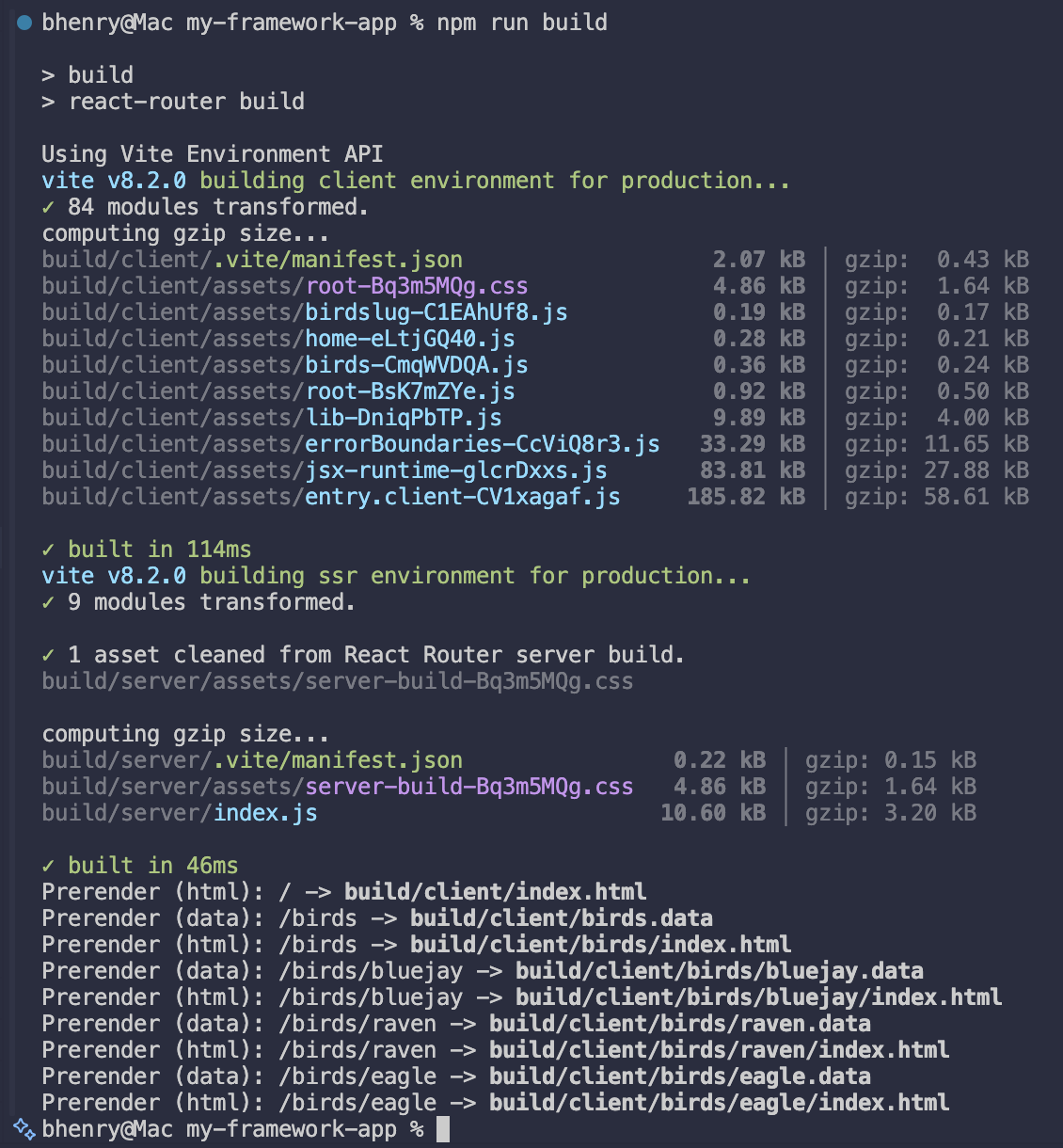
In your frontend directory, if you want to inspect the contents of your build, run the npm run preview command, and voila.